Installation Guide |
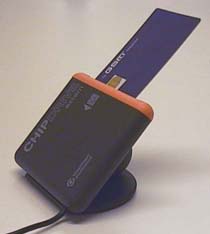
| Back to first page Note: Before performing the instructions below, it is advisable to print out this guide to have beside you. Step 1. Installation of Software1. Before installing, exit all programs. Note: If you have an earlier version of SIM Card Programmer DECT, uninstall it before you install the new one. 2. If you are a Windows 95 or Windows 98 user, restart your PC. 3. To install SIM Card Programmer DECT: Run the SETUP.EXE file (The SETUP.EXE file is located in the Setup directory.) 4. When clicking on the above SETUP.EXE link, the following happens: The File Download window appears. Choose Run this program from its current location. Press OK button. Depending on your settings in your Web browser, the Security Warning window may appear. If so, just click on Yes button. The installation program is started. Follow the instructions presented by the installation program.5. Select Type of Installation: To install SIM Card Programmer DECT, select “Full Installation, reset all settings to default”.If you do not want to install SIM Card Programmer DECT but instead just want to change user profile, select “Set / Reset User Profile, for the current user”. 6. User Information: Enter your personal data and then select one of the following user profiles: · Common User: Applies for those who shall have access to the telephone phonebook only. · Site Responsible: Applies for those who shall have access to the telephone phonebook and want to edit some of the telephone parameters. · Service: Applies for those who shall have access to the telephone phonebook and want to edit additional telephone parameters that are not accessible for user profile Site Responsible. 7. Select Destination Directory: We recommend that you accept the suggested destination directory. 8. Continue with the installation procedure to finish it. 9.: Continue with step 2 below, Connection of SIM card Reader.If you later on want to uninstall SIM Card Programmer DECT, do as follows: Go under the Start menu and select Settings> Control Panel > Add/Remove Programs. In the list of installed programs, select SIM Card Programmer DECT and press Change/Remove button. Step 2. Connection of SIM Card Reader 1. Connect the SIM card reader to a COM port on the PC. Note: If you have a laptop, make sure that the COM port is powered. As a power saver feature, the COM port on your laptop may have not been set to be powered, resulting in that the SIM card reader will not work when the built in battery in the SIM card reader is used up.2. When inserting a telephone's SIM card into the SIM card reader, use the SIM card adapter that follows with the SIM card reader. (The adapter card has the size of a credit card.) Take out the telephone's SIM card and place it into the adapter. The SIM card can be placed in the adapter in one way only. Insert the adapter in the SIM card reader with the SIM card facing up, see the picture below.
3. If you are a Windows 95 or Windows 98 user, restart your PC. 4. Start SIM Card Programmer DECT: From the Start menu select Programs>SIM Card Programmer DECT>SIM Card Programmer. 5. Before using SIM Card Programmer DECT, check the setting for serial connection as follows: Go under the File menu and select SIMCard Reader>Properties. The Application Settings window opens. Select the correct COM port. |